Showing posts with label SAML. Show all posts

Saturday, August 10, 2013

OWSM SAML Policy Tests


This post assumes readers have the basic understanding of OWSM policy framework.
In this post, I’ll explore two examples of OWSM SAML policies. There are more than a dozen SAML policies that come with OWSM. One reason for the numerous SAML policies is OWSM provides two collections of SAML policies for WSS 1.0 (WS Security 1.0) and WSS 1.1. You can explore the difference between the WSS 1.0 and 1.1 that is outside the scope of this discussion. Suffice to say that when you pick policies on the client and service sides, you need to make sure that WSS versions match.

Nearly all of the OWSM SAML policies require some kind of encryption, except two wss10_saml(20)_token_service_policy. We will experiment with the non-encryption policy first, then we’ll discuss wss10_saml(20)_token_with_message_protection_service_policy.

For the experiments, I’ll create two local weblogic domains. “Domain 1” runs on port 7001. “Domain 2” runs on 7011. (Refer to previous post on how to createmultiple domains on your localhost).

For demonstration purpose, I use the following services:
  •         A JavaEE web service – deployed to domain 2 and locked by a SAML security service policy
  •         An OSB business service – on domain 1, it hooks up to the JavaEE web service. It has an attached SAML client policy.
  •         OSB proxy service – on domain 1, locked up by WS name token security, which routes to the business service.
You can find jar files for these services here: javaEESvc and osb-config-jar. You can deploy OSB config jar to domain1, javaEESvc jar to domain2.

The steps below illustrate the test scenarios:

1.      use soap UI or other client tool to call the proxy service with ws name token header (with user name, password)
2.      OSB/OWSM authenticates the user. In this case, it uses Weblogic server’s default security realm. So you need to have a proper user defined with the Weblogic server. Proxy is invoked if the user authentication is successful.
3.      OWSM create a SAML assertion based on the authentication of step #2 above.
4.      OSB attaches the SAML assertion (user name only, no password) to the outbound business service call to the JavaEE service
5.      Weblogic/OWSM authenticates the web service call with SAML header. In this case, the authentication only verifies the user name exists in the security realm. The password doesn’t matter. If the authentication is successful, the JavaEE service is invoked.
6.      JavaEE service response is routed back to SoapUI (via business service and proxy service)

WSDL
<definitions xmlns="http://schemas.xmlsoap.org/wsdl/"
  xmlns:wsdl="http://schemas.xmlsoap.org/wsdl/" xmlns:tns="http://tempuri.org/"
  xmlns:xsd="http://www.w3.org/2001/XMLSchema" xmlns:soap="http://schemas.xmlsoap.org/wsdl/soap/"
  name="samlPocService" targetNamespace="http://tempuri.org/">
  <types>
    <xs:schema xmlns:tns="http://tempuri.org/" xmlns:xs="http://www.w3.org/2001/XMLSchema"
      version="1.0" targetNamespace="http://tempuri.org/">
      <xs:element name="sayHello" type="tns:sayHello" />
      <xs:element name="sayHelloResponse" type="tns:sayHelloResponse" />
      <xs:complexType name="sayHello">
        <xs:sequence>
          <xs:element name="arg0" type="xs:string" minOccurs="0" />
        </xs:sequence>
      </xs:complexType>
      <xs:complexType name="sayHelloResponse">
        <xs:sequence>
          <xs:element name="return" type="xs:string" minOccurs="0" />
        </xs:sequence>
      </xs:complexType>
    </xs:schema>
  </types>
  <message name="sayHello">
    <part name="parameters" element="tns:sayHello" />
  </message>
  <message name="sayHelloResponse">
    <part name="parameters" element="tns:sayHelloResponse" />
  </message>
  <portType name="samlPoc">
    <operation name="sayHello">
      <input message="tns:sayHello" />
      <output message="tns:sayHelloResponse" />
    </operation>
  </portType>
  <binding name="samlPocPortBinding" type="tns:samlPoc">
    <soap:binding style="document"
      transport="http://schemas.xmlsoap.org/soap/http" />
    <operation name="sayHello">
      <soap:operation soapAction="" />
      <input>
        <soap:body use="literal" />
      </input>
      <output>
        <soap:body use="literal" />
      </output>
    </operation>
  </binding>
  <service name="samlPocService">
    <port name="samlPocPort" binding="tns:samlPocPortBinding">
      <soap:address location="http://localhost:7011/javaeesvc/samlPocPort" />
    </port>
  </service>
</definitions>

JavaEE service:
It’s a no thrill simple hello world java function:
package javaeesvc;
import javax.jws.WebService;
@WebService(targetNamespace = "http://tempuri.org/")
public class samlPoc {
    public samlPoc() { super(); }   
    public String sayHello(String s) {
        System.out.println("######Hello " + s + ", this is saml poc");
        return "######Hello " + s + ", this is saml poc";
    }
}

JavaEE service is deployed to domain 2:

Biz Service Configuration, no policy attached yet:

Proxy service:

Then attach WS name token policy to the proxy

Experiment 1SAML Policy without Encryption
Testing “oracle/wss10_saml20_token_client_policy
In this experiment, we’ll demonstrate the SAML policy without encryption (plain SAML policies). Without encryption, there will be no additional server configurations involved.  You can merely attach the corresponding SAML policies on both the JavaEE service and OSB business service, that’s it.
In the next section we’ll see when message protection (encryption) is involved, it becomes a different ball game. You need to configure quite a few things before SAML policies can work.
Let’s do the simple one first.

Attach SAML policy to JavaEE service:

Under “Web Service Endpoints” tab, click on endpoint name “samlPocPort”:

Click on “Attach/Detach” icon:

Select “wss10_saml20_token_service_policy” then press “Attach”
Attach SAML policy to OSB business service:


SOAP UI client test:

What has happened?
Part 1: Soap UI calls Proxy Service with WSS name token
<soapenv:Envelope xmlns:soapenv="http://schemas.xmlsoap.org/soap/envelope/"
  xmlns:tem="http://tempuri.org/">
  <soapenv:Header>
    <wsse:Security soapenv:mustUnderstand="1"
      xmlns:wsse="http://docs.oasis-open.org/wss/2004/01/oasis-200401-wss-wssecurity-secext-1.0.xsd">
      <wsse:UsernameToken wsu:Id="UsernameToken-2"
        xmlns:wsu="http://docs.oasis-open.org/wss/2004/01/oasis-200401-wss-wssecurity-utility-1.0.xsd">
        <wsse:Username>weblogic</wsse:Username>
        <wsse:Password
          Type="http://docs.oasis-open.org/wss/2004/01/oasis-200401-wss-username-token-profile-1.0#PasswordText">welcome1
</wsse:Password>
      </wsse:UsernameToken>
    </wsse:Security>
  </soapenv:Header>
  <soapenv:Body>
    <tem:sayHello>
      <arg0>soupui</arg0>
    </tem:sayHello>
  </soapenv:Body>
</soapenv:Envelope>

Part 2: Business Service Invokes JavaEE service with SAML token

Internally, OWSM first authenticates user “weblogic” with password, then it generate SAML token (assertion). OSB business service attaches the SAML assertion in the header. Business service calls JavaEE service with the SAML assertion.

<soapenv:Envelope
xmlns:soapenv="http://schemas.xmlsoap.org/soap/envelope/">
<soap:Header xmlns:soap="http://schemas.xmlsoap.org/soap/envelope/">
  <wsse:Security soapenv:mustUnderstand="1"
    xmlns:wsse="http://docs.oasis-open.org/wss/2004/01/oasis-200401-wss-wssecurity-secext-1.0.xsd">
    <saml:Assertion MajorVersion="1" MinorVersion="1"
      AssertionID="SAML-xnTew5qgIPuu2kkZGcVqhQ22" IssueInstant="2013-07-29T22:26:43Z"
      Issuer="www.oracle.com" xmlns:saml="urn:oasis:names:tc:SAML:1.0:assertion">
      <saml:Conditions NotBefore="2013-07-29T22:26:43Z"
        NotOnOrAfter="2013-07-29T22:31:43Z" />
      <saml:AuthenticationStatement
        AuthenticationInstant="2013-07-29T22:26:43Z" AuthenticationMethod="urn:oasis:names:tc:SAML:1.0:am:password">
        <saml:Subject>
          <saml:NameIdentifier
            Format="urn:oasis:names:tc:SAML:1.1:nameid-format:unspecified">weblogic</saml:NameIdentifier>
          <saml:SubjectConfirmation>
            <saml:ConfirmationMethod>urn:oasis:names:tc:SAML:1.0:cm:sender-vouches
            </saml:ConfirmationMethod>
          </saml:SubjectConfirmation>
        </saml:Subject>
      </saml:AuthenticationStatement>
    </saml:Assertion>
  </wsse:Security>
</soap:Header>
<soapenv:Body>
  <urn:sayHello xmlns:urn="urn:examples:helloservice">
    <firstName xsi:type="xs:string" .>test</firstName>
  </urn:sayHello>
</soapenv:Body>
</soapenv:Envelope>

In case anyone wonders how I captured the SAML payload, I used TCPMon tool to trap the business outbound call. With OSB 11.1.1.6 version, you can also see similar payload using the OSB business service test console.

The main take away in this experiment is that OSB business service calls JavaEE with SAML assertion and user name, but no password is provided. JavaEE service is configured with a plain SAML token policy that blindly trusts anyone with a well formatted SAML token, as long as the user name exists in “Domain 2”. The web service request will be accepted.

Well, if you find this behavior questionable, then you are correct. Oracle doesn’t recommend using this “plain” dumb SAML policy. In next section, we’ll test with a SAML policy that requires “message protection”. i.e. payload will be encrypted with key (certificate), so the service requests (from the client) can be trusted with assurance by the web service (server).

SAML policy with message protection (encryption)
We’ll use wss11_saml20_token_with_message_protection_client_policy for our experiment.
This SAML policy requires the payload be encrypted (message protection). As far as OWSM policy configurations are concerned, there is not much difference between this policy and the plain SAML policy we discussed earlier. However, there are major configuration steps involved to setup the domains for the encryption/decryption to work.

Setting up certificate trusts between the two domains

If you never worked with OWSM key stores, it can be a daunting task to go through the steps in this section for the first time. You can reference this previous post to get familiar with the OWSM key stores.

By default, the key store is here {domain_home}/config/fmwconfig/default-keystore.jks. The actual key store location is specified in this file {domain_home}/config/fmwconfig/jps-config.xml

In order for message encryption/decryption to work, the two domains need to exchange their keys. “Domain 2” will import the public key of “Domain 1”. So when “domain 1” sends an encrypted message (encrypted with Domain 1’s private key), “domain 2” will be able to decrypt the message with “domain 1’s” public key. Vice versa, “domain 1” needs to import the public key of “domain 1”.

Here are the keytool commands to generate keys for each domain, and to import the public keys to each other’s key store.
 
  #### generate default keypair for domain1, valid for 10 years
  keytool -genkeypair -alias d1key  -keyalg RSA -keypass d1pass -keystore domain1-keystore.jks  -storepass welcome1 -validity 3650
  #### generate default keys for domain2, valid for 10 years
  keytool -genkeypair -alias d2key  -keyalg RSA -keypass d2pass -keystore domain2-keystore.jks  -storepass welcome2 -validity 3650

  #### list key stores
  keytool -list -v -storepass welcome1 -keystore domain1-keystore.jks
  keytool -list -v -storepass welcome2 -keystore domain2-keystore.jks

  #### export domain1 public key
  keytool -exportcert -alias d1key -storepass welcome1 -keystore domain1-keystore.jks -file domain1-pubkey.cer
  #### export domain1 public key
  keytool -exportcert -alias d2key -storepass welcome2 -keystore domain2-keystore.jks -file domain2-pubkey.cer

  #### import domain2 public key into domain 1 as "d2impkey"
  keytool -importcert -alias d2impkey -storepass welcome1 -keystore domain1-keystore.jks  -file domain2-pubkey.cer
  #### import domain1 public key into domain 2 as "d1impkey"
  keytool -importcert -alias d1impkey -storepass welcome2 -keystore domain2-keystore.jks  -file domain1-pubkey.cer

  ### if you need to remove a key
  keytool -delete  -alias yourkey  -keystore keystore.jks -storepass welcome1

The screen below shows how to configure the key store for domain 1. Pay close attention to each field in this screenshot and notice how the field values correspond to the values we used in the key commands above. You will need to bounce the servers if you change key store files. Remember the default is default-keystore.jks, which is specified in jps-config.xml.

This screen shows how to configure the key store for domain 1.

Once the OWSM key stores are configured for both domains. You will detach the plain SAML policies from javaEESvc on domain 2 and the business service on domain 1. Then reattach wss10_saml20_token_with_message_protection_service_policy to JavaEESvc, and wss10_saml20_token_with_message_protection_client_policy to the OSB business service.

You also need to configure the security property on the business service as shown below.The recipient alias is the domain 2 public key. We imported into domain 1 with the alias "d2impkey". This key will be actually used to decrypt the response message from domain 2, which is encrypted with domain's private key.

This screen shows how to configure the business service “security” tab:

You will need to configure domain 2 OWSM key store similarly.

Test in OSB console

If everything is configured correctly, you can test the business service from the OSB console (works for OSB 11.1.1.6, may not work for earlier version)
The test console shows data is encrypted:

Test with SoapUI
The SoapUI test will show the same thing either SAML policy is encrypted or not encrypted.
Final notes:
I used OSB and JavaEE service for the experiments. You can also use SOA composite to test the SAML policies. It is recommended to use JDeveloper to attach policies to SOA composite, but you can also use "em" console to the same.

Wednesday, July 24, 2013

OWSM Note - When import certs, remember to bring in the chain if neccessary

OWSM has so many aspects, it's impossible to discuss OWSM in a few posts. So I'm splitting things up and add specific notes as I go.
Context: I am running test with SAML policy with msg protection on two hosts. The client server has a key store contains its private key “foo”, and server contains private key “bar”.
BTW, OWSM key store, by default, is under <domain home>/config/fmwconfig/default-keystore.jks. The actual location can be found in <domain home>/config/fmwconfig/jps-config.xml.
After I exchanged the certs of the two servers, the picture looks like:
·        Client key store: client private key “foo”, imported server cert “bar
·        Server key store: server private key “bar”, “bar CA”, imported client cert “foo”
when I ran the test, the client side log file produces this:
<Error> <oracle.wsm.resources.security> <WSM-00138>
The path to the certificate is invalid due to Path does not chain with any of the trust anchors .
Validation failed for certificate "CN=bar, OU=Application Development & Architecture, O=ACME Inc., L=Phoenix, ST=Arizona, C=US" Issuer of certificate is "C=US, ST=Arizona, L=Phoenix, O="ACMEInc.", OU=Application Development & Architecture, CN=bar CACertificates in cert path used for validation are  CN=foo, OU=Application Development & Architecture, O=ACME Inc., L=Phoenix, ST=Arizona, C=US.
Looking at key store picture above, it appears that I have exchanged keys “foo” and “bar” properly. So we do I get cert errors? After closely examine the errors messages and the key stores, I found out the problem is the cert I imported into the client store was not a root CA cert. I need to import the server cert as well as it's CA. Here is the new picture:
·        Client key store: client private key “foo”, imported server cert “bar”, imported server “bar CA” cert
·        Server key store: server private key “bar”, “bar CA”, imported client cert “foo
The revealing parts of the error message are “path to the certificate” and “chain”. That leads me to examine the key stores. I noticed that server cert “bar” shows “Certificate chain length: 2”, and finally I realized importing “bar” alone to the client store without its CA is causing the problem. The solution is to import “bar CA” into the client store as well. That took care of the problem.
Let me list all the keytool commands I use to diagnose and resolve the issue. Keytool is under Java bin directory.
Generate key pair:
keytool -genkeypair -alias foo  -keyalg RSA -keypass welcome1 -keystore client-keystore.jks  -storepass welcome1 -validity 3650
I am getting into the habit to set validity to 10 years (3650 days). I ran into too many times of using the default of 1 year, then my test server stops running after a year, and took me long time to find out why.
Keep in mind, alias “foo” is only a local alias in this key store, when you export “foo”, then re-import it into another store, you can give it a different alias, say for example, call it “client_foo”.
Examine the key store:
keytool -list -v -storepass welcome1 -keystore client-keystore.jks
When I ran this command on the server key store, I saw the server cert has a key length of 2. I also found the CA for the server cert in the same key store.
Export cert:
keytool -exportcert -alias foo -keystore client-keystore.jks -storepass welcome1 -file client_foo.cer
Import cert:
keytool -importcert -alias client_foo -keystore server_keystore.jks -storepass serverKeyPass -file client_foo.cert
Import CA cert:
keytool -importcert -trustcacerts -alias "bar CA" -keystore client-keystore.jks -storepass welcome1 -file bar-ca.cer
If the cert you import is chained to a CA (or more), you need to import CA certs.

Tuesday, June 11, 2013

salesforce.com and Shibboleth SSO

It's an odd subject for me to blog about. My knowledge level of salesforce.com is practically 0; my knowledge level with Shibboleth: 0. I learned this word and the product a few days ago when I had to help diagnose an SSO issue between force.com and a client site.

There are tons of posts sharing their experience on how to make SSO work between force.com and Shibboleth. Everyone shared their success and failure stories. I mostly chewed on these posts and with trial and errors and made it work in our case. I thought I'd share what I learned.

Shibboleth version: 2.3.5.

On force.com site:
Part I
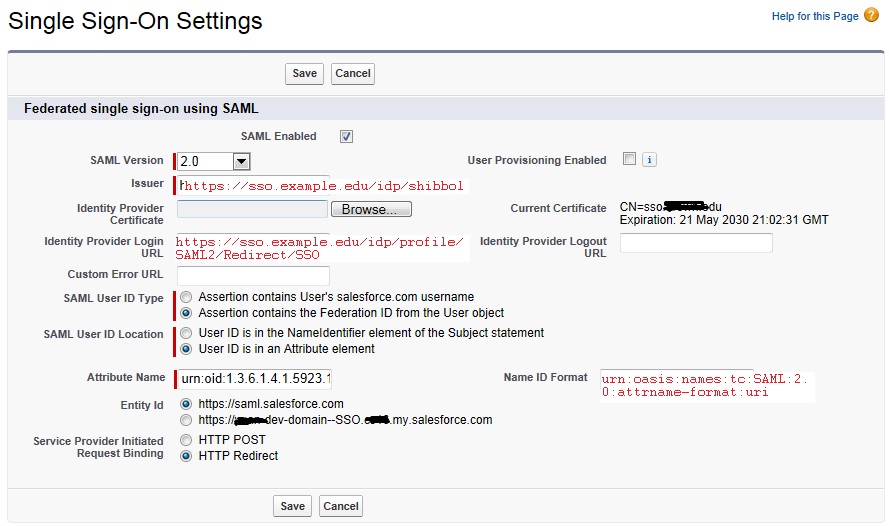
1. check SAML enabled (leave "User Provding Enabled" unchecked), chose SAML version 2.0
2. set issuer as provided by IDP: https://sso.example.edu/idp/shibboleth
3.import the certificate from the client Shibboleth IDP provided
4. select Federation ID
5. select Use ID is attribute, fill in attribute name and format (I collected these from a sample IDP response assertion sample, see the sample assertion below, towards the bottom of the payload)
6. Entity ID: https://saml.salesforce.com
7. HTTP Redirect
save changes

Edit screen dump:

view screen dump:

8. On SSO settings page, click "Download Metadata", save the file and send it to IDP, and tell IDP to update relying-part.xml to point to this file (MetadataProvider/@metadataFile)

Part II
Select Setup menu, search for "my domain", then select "Use the following Authentication Service My SAML IDP"

Part III

IDP side:

  • update relying-part.xml (as in step 8 above)
  • set encryption to OFF
  • set sign signature to ON

That did the trick.

Here is the sample meta data dump:
<?xml version="1.0" encoding="UTF-8"?><md:EntityDescriptor xmlns:md="urn:oasis:names:tc:SAML:2.0:metadata" xmlns:ds="http://www.w3.org/2000/09/xmldsig#" entityID="https://saml.salesforce.com" validUntil="2023-06-11T21:25:53.105Z">
   <md:SPSSODescriptor AuthnRequestsSigned="true" WantAssertionsSigned="true" protocolSupportEnumeration="urn:oasis:names:tc:SAML:2.0:protocol">
      <md:KeyDescriptor use="signing">
         <ds:KeyInfo>
            <ds:X509Data>
               <ds:X509Certificate>MIIFBzCCA++gAwIBAgIQDJ4ihF+4VYzLxb+qASp7IzANBgkqhkiG9w0BAQUFADCBvDELMAk
GA1UEBhMCVVMxFzAVBgNVBAoTDlZlcmlTaWduLCBJbmMuMR8wHQYDVQQLExZWZXJpU2lnbi
...
xcHB+08lZiJzKwN/yg==</ds:X509Certificate>
            </ds:X509Data>
         </ds:KeyInfo>
      </md:KeyDescriptor>
      <md:NameIDFormat>urn:oasis:names:tc:SAML:1.1:nameid-format:unspecified</md:NameIDFormat>
      <md:AssertionConsumerService Binding="urn:oasis:names:tc:SAML:2.0:bindings:HTTP-POST" Location="https://test.salesforce.com/?saml=MgoTx78aEPqYOjf4wsNP4y2cWzUwlVn8UjYAqjjrKUbZUNj9Y1hnr9fJpa" index="0" isDefault="true"/>
      <md:AttributeConsumingService index="0" isDefault="true">
         <md:ServiceName xml:lang="en">Salesforce.com</md:ServiceName>
         <md:RequestedAttribute Name="urn:oid:1.3.6.1.4.1.5923.1.1.1.6" NameFormat="urn:oasis:names:tc:SAML:2.0:attrname-format:uri" isRequired="true"/>
      </md:AttributeConsumingService>
   </md:SPSSODescriptor>
</md:EntityDescriptor>

here is a sample response assertion:

<saml2p:Response xmlns:saml2p="urn:oasis:names:tc:SAML:2.0:protocol" Destination="https://test.salesforce.com" ID="_70d94b9224a1f64d1bc1d08a7e0f82a8" InResponseTo="_2QbMVwlP6T4mfIKpaguiKDq1rvofuyOI2ueT5fZIQgZ9m6lSZGRWjkDAEd5sEc12NjwotQcMb_XPhwTjcxWcMxobH3fduZo8KoINe.8L0XGshPftH8XN1x907ZyfA4VWJ_3.LlbBtovzGixXRAOzLv8i6srSME.ujlR2g6KpU3x6auSu9Dv7kx5f3r_u32dPF0PEZKODHMtxlVXaycGYuMgC2w0s8.g" IssueInstant="2013-06-11T16:03:15.201Z" Version="2.0" xmlns:xs="http://www.w3.org/2001/XMLSchema">
   <saml2:Issuer xmlns:saml2="urn:oasis:names:tc:SAML:2.0:assertion" Format="urn:oasis:names:tc:SAML:2.0:nameid-format:entity">https://sso.examle.edu/idp/shibboleth</saml2:Issuer>
   <ds:Signature xmlns:ds="http://www.w3.org/2000/09/xmldsig#">
      <ds:SignedInfo>
         <ds:CanonicalizationMethod Algorithm="http://www.w3.org/2001/10/xml-exc-c14n#"/>
         <ds:SignatureMethod Algorithm="http://www.w3.org/2000/09/xmldsig#rsa-sha1"/>
         <ds:Reference URI="#_70d94b9224a1f64d1bc1d08a7e0f82a8">
            <ds:Transforms>
               <ds:Transform Algorithm="http://www.w3.org/2000/09/xmldsig#enveloped-signature"/>
               <ds:Transform Algorithm="http://www.w3.org/2001/10/xml-exc-c14n#">
                  <ec:InclusiveNamespaces xmlns:ec="http://www.w3.org/2001/10/xml-exc-c14n#" PrefixList="xs"/>
               </ds:Transform>
            </ds:Transforms>
            <ds:DigestMethod Algorithm="http://www.w3.org/2000/09/xmldsig#sha1"/>
            <ds:DigestValue>papIEukge3hRwbglEkofGy/ybdI=</ds:DigestValue>
         </ds:Reference>
      </ds:SignedInfo>
      <ds:SignatureValue>q7Sdhz8UC46qUE+yycOoQQ2bLorgZ6HJvONokm9aa1bv+bF4MAljS8p7M7aYeyDZnGk+rDyrQzO+ctL0IfjNZimE8dhW1dt1HDS/6cjyK7zKWZMueEHRWbZPs6GYOYHSYWr2DFplngJYbwZQ4CfNp4yCHjOuGoo0I9Tr0P24/V8b3RMNnN5XAK5GPR/nW+nYsCS8UWeMOcRLg+NvjMfVGczL2Z4XfUHT6Odj6ckiEPCQkzRwg26bl//Lz0zMgDN7QtX0BflMLuS09trDHKfblLCtXAakSjBfaythCxpKCvSIUgMk1FlwCRS+15/YYBF+dTGf8mWCCgFJ6ZF+Euz/Kw==</ds:SignatureValue>
      <ds:KeyInfo>
         <ds:X509Data>
            <ds:X509Certificate>MIIDHzCCAgegAwIBAgIUHPSdb4ae0QA3fyeEIe7wKXi2oT0wDQYJKoZIhvcNAQEFBQAwGDEWMBQG
...
ztgLcVw=</ds:X509Certificate>
         </ds:X509Data>
      </ds:KeyInfo>
   </ds:Signature>
   <saml2p:Status>
      <saml2p:StatusCode Value="urn:oasis:names:tc:SAML:2.0:status:Success"/>
   </saml2p:Status>
   <saml2:Assertion xmlns:saml2="urn:oasis:names:tc:SAML:2.0:assertion" ID="_09daf40a77318b7f391fa99c5d2829de" IssueInstant="2013-06-11T16:03:15.201Z" Version="2.0" xmlns:xs="http://www.w3.org/2001/XMLSchema">
      <saml2:Issuer Format="urn:oasis:names:tc:SAML:2.0:nameid-format:entity">https://sso.examle.edu/idp/shibboleth</saml2:Issuer>
      <ds:Signature xmlns:ds="http://www.w3.org/2000/09/xmldsig#">
         <ds:SignedInfo>
            <ds:CanonicalizationMethod Algorithm="http://www.w3.org/2001/10/xml-exc-c14n#"/>
            <ds:SignatureMethod Algorithm="http://www.w3.org/2000/09/xmldsig#rsa-sha1"/>
            <ds:Reference URI="#_09daf40a77318b7f391fa99c5d2829de">
               <ds:Transforms>
                  <ds:Transform Algorithm="http://www.w3.org/2000/09/xmldsig#enveloped-signature"/>
                  <ds:Transform Algorithm="http://www.w3.org/2001/10/xml-exc-c14n#">
                     <ec:InclusiveNamespaces xmlns:ec="http://www.w3.org/2001/10/xml-exc-c14n#" PrefixList="xs"/>
                  </ds:Transform>
               </ds:Transforms>
               <ds:DigestMethod Algorithm="http://www.w3.org/2000/09/xmldsig#sha1"/>
               <ds:DigestValue>cJ6IIEUMHXI6f4qAhgnLl5RPqTA=</ds:DigestValue>
            </ds:Reference>
         </ds:SignedInfo>
         <ds:SignatureValue>a1HCaukY6f6WfB65rSt5zDug+GoAiBohujqt5DSnjYBIg5X9VSCoLIop+sqG790h/v1fTuQyeOXCQpuC745sWn8lFNFPqR8SjZqMR2G6JDHjDtOWpgB4zjWcES3i6SAwSlnEL63WUj0vzCuqt6JYyUmg+xKr8kBVUz4MZEch08pKj4qbeao58WD1YXWBUeT6yHPe44YG9FoPHiP+SicQ/Ea4qwOtnogh6oF8aM4tpAcpyNw924uOPcDe5d20suBZ1DgTLM+B6nLWhxH5FDvmsU9TmGOWAQ63fGY+ZYKN+GFsieiYIPbT6XKOYcOwaxtYdZ7hoebhdv5f4sLvHxRjGQ==</ds:SignatureValue>
         <ds:KeyInfo>
            <ds:X509Data>
               <ds:X509Certificate>MIIDHzCCAgegAwIBAgIUHPSdb4ae0QA3fyeEIe7wKXi2oT0wDQYJKoZIhvcNAQEFBQAwGDEWMBQG
...
ztgLcVw=</ds:X509Certificate>
            </ds:X509Data>
         </ds:KeyInfo>
      </ds:Signature>
      <saml2:Subject>
         <saml2:NameID Format="urn:oasis:names:tc:SAML:2.0:nameid-format:persistent" NameQualifier="https://sso.examle.edu/idp/shibboleth">4nKARGsfororZJ89y5wDMkZJuE4=</saml2:NameID>
         <saml2:SubjectConfirmation Method="urn:oasis:names:tc:SAML:2.0:cm:bearer">
            <saml2:SubjectConfirmationData Address="10.25.181.45" InResponseTo="_2QbMVwlP6T4mfIKpaguiKDq1rvofuyOI2ueT5fZIQgZ9m6lSZGRWjkDAEd5sEc12NjwotQcMb_XPhwTjcxWcMxobH3fduZo8KoINe.8L0XGshPftH8XN1x907ZyfA4VWJ_3.LlbBtovzGixXRAOzLv8i6srSME.ujlR2g6KpU3x6auSu9Dv7kx5f3r_u32dPF0PEZKODHMtxlVXaycGYuMgC2w0s8.g" NotOnOrAfter="2013-06-11T16:08:15.201Z" Recipient="https://test.salesforce.com"/>
         </saml2:SubjectConfirmation>
      </saml2:Subject>
      <saml2:Conditions NotBefore="2013-06-11T16:03:15.201Z" NotOnOrAfter="2013-06-11T16:08:15.201Z">
         <saml2:AudienceRestriction>
            <saml2:Audience>https://saml.salesforce.com</saml2:Audience>
         </saml2:AudienceRestriction>
      </saml2:Conditions>
      <saml2:AuthnStatement AuthnInstant="2013-06-11T16:03:14.850Z" SessionIndex="7143fd8ba813f44fa9fb11512f50175b00ab09b21b7ca7d442164ebbda6b8281">
         <saml2:SubjectLocality Address="10.25.181.45"/>
         <saml2:AuthnContext>
            <saml2:AuthnContextClassRef>urn:oasis:names:tc:SAML:2.0:ac:classes:PasswordProtectedTransport</saml2:AuthnContextClassRef>
         </saml2:AuthnContext>
      </saml2:AuthnStatement>
      <saml2:AttributeStatement>
         <saml2:Attribute FriendlyName="eduPersonPrincipalName" Name="urn:oid:1.3.6.1.4.1.5923.1.1.1.6" NameFormat="urn:oasis:names:tc:SAML:2.0:attrname-format:uri">
            <saml2:AttributeValue>john.doe@examle.edu</saml2:AttributeValue>
         </saml2:Attribute>
      </saml2:AttributeStatement>
   </saml2:Assertion>
</saml2p:Response>